REVIEW · VERONA
Verona Audioguide – TravelMate app for your smartphone
Book on GetYourGuide →Operated by MyWoWo Srl · Bookable on GetYourGuide
Verona without a guidebook. Just your phone. This TravelMate audioguide lets you explore at your own speed with 21 professionally produced audio tracks that cover major sights and local curiosities across Verona.
I especially like that you can get started fast since there’s no meeting point and no paper tickets to collect. I also love that the guide is repeatable for 1365 days after first activation and can work online or offline, so one paid download can serve multiple walks or replays.
One thing to consider: it’s strictly self-guided. If you want a live person to answer questions on the spot, you’ll need to pair this with some extra on-the-ground help.
In This Review
- Key highlights you’ll actually use
- Verona at your pace: what “autonomy” really means
- Price and value: is $9 worth it?
- Getting started: activation, no meeting point, and how you load it
- Download the right app
- Find your activation code
- What you’ll hear in Verona: 21 sections covering the core sights
- Verona introduction
- Arena Basilica of San Zeno
- Basilica of Santa Anastasia
- Castelvecchio
- Cathedral
- Old town
- Oltre Adige
- The wonders of local cuisine
- Best way to use earphones, offline mode, and the in-app text
- Earphones make the difference
- Use offline when signal gets messy
- Read the text when you want control
- Take the quiz if you like reinforcement
- Wheelchair access and who should choose this format
- Should you book the TravelMate Verona audioguide?
- FAQ
- Do I need a paper ticket to do this Verona experience?
- Is there a meeting point for the activity?
- How do I find my activation code?
- Where can I download the TravelMate app?
- Can I listen to the audioguide offline?
- How long is the audio content?
- What languages are included?
- Is there text available besides audio?
- Is the app available for wheelchair users?
- What is the cancellation policy?
- How long is the voucher valid?
Key highlights you’ll actually use

- No paper ticket, no waiting: download the app and start right away.
- Works online or offline: good for saving your data and for unpredictable signal.
- 21 audio sections, 63 minutes total: enough structure to feel oriented without feeling rushed.
- Text is available in the app: listen now, read along when you want.
- Quiz section included: short questions to test what you picked up.
- Your own phone, your own earphones: you avoid sharing devices with anyone else.
Verona at your pace: what “autonomy” really means

This isn’t a guided group tour where you wait, follow, and keep track of everyone else. With the TravelMate app, you’re in charge. You download the app, enter your activation code, and then you can press play wherever you’re standing—no assigned time slot and no choreographed route required.
That autonomy matters in Verona because the center is best enjoyed in short bursts. You can do ten minutes of audio while you’re near a landmark, pause for a coffee, then come back later when the light changes. The app also includes the text of the audio files, which is handy if you’re in the mood for reading rather than listening.
The content is designed to feel like a guide at your side. The audio covers the history, points of interest, and curiosities connected to the sights listed in the app. It’s also produced by professional audio creators and interpreted by professionals from the television and radio world—so you’re not stuck with a flat, classroom-style narration.
You can also read our reviews of more tours and experiences in Verona.



Price and value: is $9 worth it?
At $9 per person, the value comes from two things the app gives you that many tours don’t: time flexibility and reusability.
First, you’re paying for 21 audio sections totaling about 63 minutes of content. That’s long enough to create a real structure to your day, especially if you listen in chunks while walking. Second, the guide is valid for 1365 days from your first activation. That’s not just “valid for your trip”—it’s “valid long enough to do this again if you return to Verona or if you want to take a second pass while things are fresh.”
You also get more than audio. There’s a quiz section built in, plus the ability to read the audio text inside the app. In practice, that can turn a simple walk into something closer to a self-paced mini-lesson.
Where the price math changes is if you only want a quick overview and you’re the type who prefers live guidance. In that case, you might feel like you didn’t fully use the track time. But if you like exploring independently, $9 is a pretty low-risk way to add context to your sightseeing.
Getting started: activation, no meeting point, and how you load it

There’s no meeting point. Instead, the activity is tied to your phone. That sounds simple—and it is—but it helps to know the activation routine before you’re standing on a street corner with a dead battery.
Download the right app
- For Android: download the app called TRAVELMATE from the Play Store.
- For iOS: download TRAVELMATE TM from the App Store.
Find your activation code
Your activation code is in your email. Look for the option to show activity details or show your tickets. Then:
- Tap the big barcode inside the orange frame.
- A black-and-white barcode appears.
- The 10-digit activation code is shown as a small number just under the barcode.
If you bought through the GetYourGuide flow, you may also see the ticket in the GetYourGuide app. From there, you can open the barcode view and grab the 10-digit code the same way. If you don’t have the GetYourGuide app installed, the process may redirect you to download it first.
Practical tip: do this at home or in a café with stable Wi‑Fi. Once the app is set up, you can go out and enjoy the city without thinking about tickets again.





What you’ll hear in Verona: 21 sections covering the core sights

The app’s content is organized into 21 audio files for a total of about 63 minutes. Each section is meant to give you story and interpretation as you look at the relevant spot. You can treat it like a menu: start with what you want to see, then fill in the rest.
Here are the sections included in the Verona audioguide:
Verona introduction
This is where the app helps you get bearings fast. You’ll hear a basic orientation—how to think about Verona and what kind of sights you’re about to meet—so the rest of the audio feels less like random facts and more like a guided walk through the city’s themes.
Arena Basilica of San Zeno
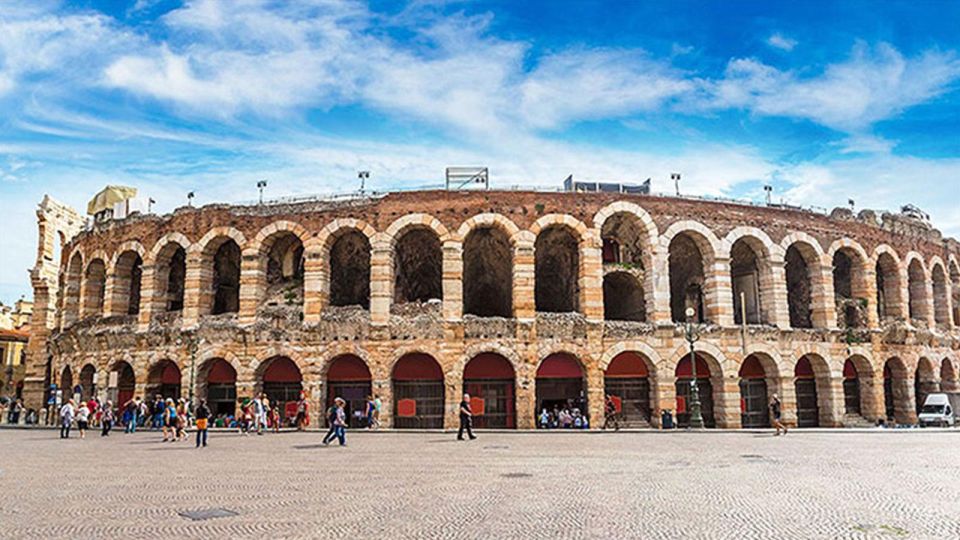
San Zeno’s area is one of the city’s recognizable stops, and the app section is built to explain what you’re looking at. You can expect the audio to mix background context with points of interest and small curiosities tied to the basilica.
A good way to use this section is to listen for a few minutes, then look back at the building with fresh eyes. When an audio guide tells you what to notice, your photos usually get better too.
Basilica of Santa Anastasia
This track focuses on another major basilica. Like the San Zeno module, it’s designed for independent viewing: you hear the story, then you connect it to the features you’re standing in front of.
If you’re short on time, you can still get value by playing a part of this track right before you move on. The audio is structured so you don’t need to commit to listening to everything start-to-finish.
Castelvecchio
Castelvecchio is covered as its own audio section. The app’s angle is practical and interpretive, so you should come away with a clearer sense of why the site matters and what details are worth noticing while you’re there.
This is also a nice stop to listen while you stroll, since fortresses and old sites reward looking around rather than just photographing one front view.
Cathedral
The cathedral gets a dedicated module. You’ll hear history and curiosities tied to the cathedral experience, which helps if you’ve seen cathedrals before but want a Verona-specific lens.
A small caution: if you’re listening at full volume in a quiet area, keep it respectful. Earphones are recommended for best audio quality, but you’ll still want to match the environment.
Old town
This section shifts from individual monuments to the wider feel of the historic core. Expect the audio to help you understand what you’re walking through—why the old town layout matters and what kinds of interest points you’re likely to spot along the way.
This is a great “between landmarks” track. If you get lost in the best way, play it while you reorient.
Oltre Adige
Oltre Adige is another named area in the guide. The audio section focuses on that part of Verona, with history, points of interest, and curiosities aimed at helping you understand what’s distinctive about it.
If you like neighborhood exploration (not just single attractions), this is one of the modules that can make the walk feel more like a story than a checklist.
The wonders of local cuisine
This is the culinary angle of the app. Rather than generic restaurant advice, the module is framed as “wonders” of local cuisine, so you’re guided to think about what you’re eating as part of the city’s identity.
Even if you don’t follow every suggestion, the main benefit is awareness. When an audio guide explains what a dish represents—or what makes it special in Verona—you make better choices and you remember the meal more clearly.
Best way to use earphones, offline mode, and the in-app text

The app’s format is simple: press play and walk. Still, a few choices can make a big difference.
Earphones make the difference
Earphones are recommended for a better listening experience. This matters because Verona’s streets can be lively, and the audio is your “guide voice.” With earphones, you’ll hear the tone and pacing that professional interpreters bring to the narration.
Use offline when signal gets messy
The app supports listening online or offline. That’s a big deal in older city centers where Wi‑Fi can be spotty. If you want a smoother day, plan to download or keep the audio available through the app setup before heading out.
Read the text when you want control
You can read the text of the audio files in the app. This is perfect when you’re pausing for photos, waiting out a queue, or just want to skim the points you’ll remember later.
Take the quiz if you like reinforcement
There’s a quiz section included. It’s short-question style and helps you learn what you just heard. If your goal is memory (not just entertainment), don’t skip it.
Wheelchair access and who should choose this format

This audioguide is listed as wheelchair accessible, which is a good sign that the experience is designed for independent use rather than a rigid physical meet-up.
Who this is for:
- You want autonomy and you like making your own route.
- You like listening in small chunks while sightseeing.
- You want a budget-friendly way to add context without paying for a full guided day.
Who might feel it’s not enough:
- You want a live guide to answer questions in real time.
- You prefer a tight itinerary with timed tickets and staff-led movement.
- You dislike phone-based experiences and prefer printed materials only.
Also, note the overall rating is 3.3 (7 reviews). That usually points to mixed fit—often not a “bad product” so much as a “depends on your style.” If you’re the kind of person who enjoys self-paced travel, you’ll likely get more out of it.
Should you book the TravelMate Verona audioguide?

If you’re visiting Verona and you want a low-cost way to understand what you’re seeing, I’d say this is a smart buy—especially because you can replay it for 1365 days and use it offline. The app structure (21 sections, about 63 minutes) gives you enough backbone to feel guided, without forcing you into a group schedule.
I’d skip it only if you know you want live interpretation, or if you’re uncomfortable relying on a smartphone for your main information source. In that case, pair a simpler audio option with a different kind of guidance.
If you’re good with self-guided walking and you like learning while you go, this Verona app is the kind of practical add-on that makes the city feel more personal.
FAQ
Do I need a paper ticket to do this Verona experience?
No. You download the TravelMate app and start your experience using an activation code found in your email (or in the GetYourGuide app view).
Is there a meeting point for the activity?
No. There’s no meeting point. You can download the app and begin right away wherever you prefer.
How do I find my activation code?
Check your email for activity details or a ticket view, then open the barcode area. The activation code is a 10-digit number just under the barcode. You can also access it through the GetYourGuide app if you see the ticket there.
Where can I download the TravelMate app?
On Android, download the app called TravelMate from the Play Store. On iOS, download TravelMate TM from the App Store.
Can I listen to the audioguide offline?
Yes. The guide can be listened to online or offline.
How long is the audio content?
The audioguide includes 21 audio contents for a total of about 63 minutes.
What languages are included?
The audio guide is available in French, Italian, German, English, Russian, Chinese, and Spanish.
Is there text available besides audio?
Yes. You can read the text of the audio files inside the app.
Is the app available for wheelchair users?
It’s listed as wheelchair accessible.
What is the cancellation policy?
Free cancellation is available up to 24 hours in advance for a full refund.
How long is the voucher valid?
It’s valid for 1365 days from the first activation.